What is Sparkel AI? Automated BOQs from BIM Models and PDFs
The secret to profit isn’t in the build. It’s in the BOQ. Every tender your team prices starts with quantities, and every quantity still traced by hand is a margin risk. Sparkel AI is a cloud platform that reads PDF drawings and BIM models with artificial intelligence and turns them into live, structured quantities your estimators can price with confidence.
In this guide, we explain what Sparkel AI does, how its four step workflow runs, and how QS and BIM teams across the GCC put it to work with local support from GFT.

Why BOQ Production Is Still the Bottleneck in 2026
Construction has a well documented productivity problem. McKinsey Global Institute research found that labor productivity growth in construction averaged only 1 percent a year over two decades, compared with 2.8 percent for the total world economy and 3.6 percent for manufacturing. Quantity takeoff sits right at the center of that gap.
Walk into almost any estimating office in Riyadh, Dubai, or Cairo and you will see the same three pressures:
- PDFs still win tenders. Most specialty packages arrive as sheets, not models, and tracing every sheet by hand consumes days per bid.
- BIM is uneven. Models rarely arrive structured the way a BOQ needs them, so teams either rebuild the model or fall back to PDF.
- Revisions restart the loop. A new drawing issue lands, and the takeoff starts again with no clear record of what changed.
The result is two separate tools, two versions of the truth, and a QS team that spends more time measuring than pricing risk. This is exactly the gap Sparkel AI was built to close.
What Is Sparkel AI?
Sparkel AI is a browser based quantity takeoff platform that reads both 2D PDF plans and 3D BIM models (including IFC files) inside one workspace. Instead of asking your team to trace every line or wait for a perfect model, the platform uses AI detectors called Autoshapes to find rooms, areas, zones, and repeating symbols automatically. Those detections resolve into live quantity rows inside tables you structure to match your own BOQ format and cost codes.
Four ideas define the platform:
- One workspace for sheets and models, so you start on PDF and expand to BIM without switching tools.
- AI detection that feeds real quantity rows, not just markups on a drawing.
- Built for imperfect inputs, from messy scanned PDFs to poorly structured BIM.
- Quantities that stay live across revisions, with history and comparisons on the Pro plan.
GFT distributes and supports Sparkel across the MENA region, so your team gets the software together with onboarding, training, and local technical support.
How Sparkel AI Turns Drawings into BOQ Quantities in 4 Steps
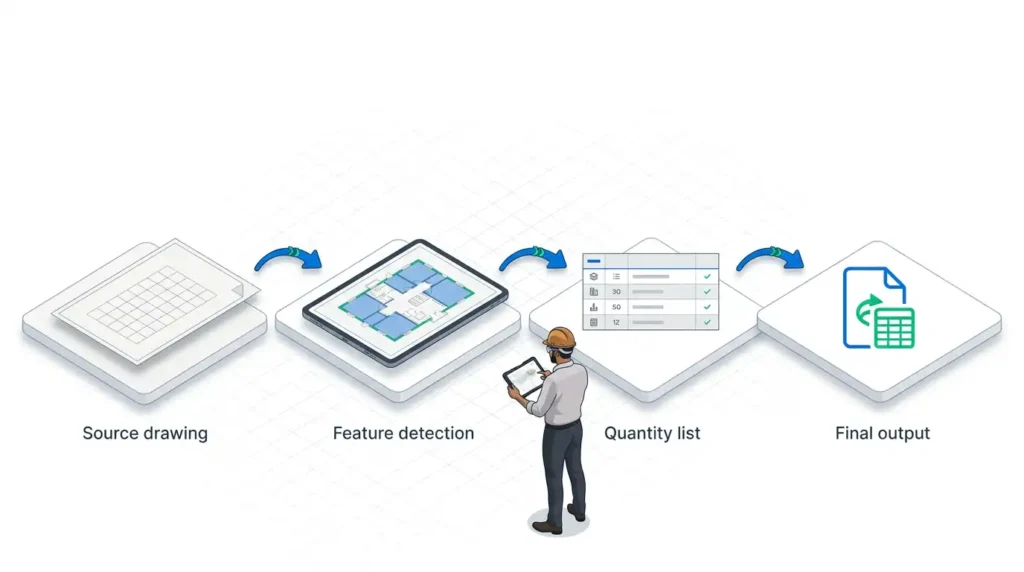
Sparkel follows one simple path from drawing to BOQ: Upload, Autoshape, Table, Export.
- Step 1: Upload your drawings. Drop in the full drawing set. On the Pro plan, add the BIM model to the same project.
- Step 2: Run Autoshapes. The AI detects rooms, areas, and repeating symbols (for example, MEP devices) and converts them into measurable shapes.
- Step 3: Trust the table. Detections flow into structured items and quantities that you set up once and reuse across bids.
- Step 4: Export or automate. Export to Excel or a PDF sheet for your team, or connect internal systems and AI agents through the Sparkel API and MCP server.
The workflow is automate first, then review. Your estimators fix edge cases with manual tools, so professional judgment stays in control of every final number.
Autoshapes: The AI Engine Behind Sparkel AI
Autoshapes are what separate Sparkel from a traditional digital measuring tool. Point them at a sheet, or at a model on Pro, and they deliver three core detections:
- Room and area detection from floor plan PDFs, plus 3D room detection on BIM models (Pro).
- Symbol detection for repeating devices, which turns MEP counts from a manual click marathon into a reviewed list.
- Robust handling of imperfect inputs, extracting value even when metadata fails and geometry is dirty.
For a QS, that means fewer hours clicking and more hours checking. For a BIM manager, it means quantities no longer depend on a flawless model.

Sparkel AI for the QS and Estimator: Faster, Defensible BOQs
Your reputation rests on accuracy. Sparkel protects it in four practical ways:
- Tables that fit your cost codes, not a fixed WBS, so the output reads like your BOQ from day one.
- Reusable structures, so a takeoff template built for one villa tender carries straight into the next.
- Version history on Pro, so when a revision lands you can show management exactly which quantities moved and why.
- Clean Excel export that drops directly into your pricing workbook.

Sparkel AI for the Technical Lead: Value from Imperfect BIM
Every BIM manager knows the model that arrives from a consultant is rarely the model a QS needs. Sparkel lets your team enrich quantities without touching the original model. You link model elements to BOQ items line by line, and Sparkel visually flags any element not yet linked, so nothing silently drops out of the takeoff.
When part of a model is too incomplete to trust, your team measures that scope in 2D inside the same environment and keeps one consolidated table. Through the API and MCP server, your internal dashboards and automation tools read the same source of truth as your estimators. Combined with GFT’s BIM execution services from LOD 100 to 500 and clash free coordination, this closes the loop between the model your team coordinates and the BOQ your commercial team prices.
Manual Takeoff vs Model Only Extraction vs Sparkel
| Criteria | Manual PDF Takeoff | Model Only Extraction | Sparkel |
|---|---|---|---|
| Input formats | PDF only | Clean BIM only | PDF and BIM in one workspace |
| Messy or incomplete drawings | Slow, by hand | Breaks or needs model rework | Autoshapes built for imperfect inputs |
| Design revisions | Full redo | Re export and re map | History and comparisons (Pro) |
| Output structure | Estimator’s spreadsheet | Follows the model’s structure | Your own tables and cost codes |
| Automation | None | Limited | API and MCP for agents and tools |
Where Sparkel Fits in the GFT Ecosystem
GFT is not a single software reseller. We combine six leading platforms (PlanSwift, ZWCAD, Procore, PlanRadar, OpenSpace, and Sparkel) with quantity surveying, BIM execution, and training services. For firms already running PlanSwift on PDF takeoffs, Sparkel adds AI detection and a direct path into BIM quantities (see what’s new in PlanSwift Takeoff BOOST). For teams tracking site progress with OpenSpace 360° capture, Sparkel strengthens the commercial side of the same digital workflow.
Behind every license stands 20 years of industry experience, 800+ MENA clients, and 3,500+ projects across 27 countries. We onboard your team, train your estimators and BIM coordinators, and stay on call locally when a tender deadline gets tight.
Get Automated BOQs with Sparkel AI from GFT
Your BOQ accuracy is only as good as your process. Automated quantities from PDF drawings and BIM models with Sparkel AI from GFT give your QS team speed and your technical team a single source of truth.
Book your free consultation and we will walk you through Sparkel on one of your own live tender drawings.
Frequently Asked Questions
What is Sparkel AI used for?
Sparkel AI is used for quantity takeoff. It reads PDF drawings and BIM models with AI and turns them into structured, live quantities that feed your BOQ and cost estimate.
Can Sparkel read both PDF drawings and BIM models?
Yes. Sparkel handles 2D PDF plans on every plan, and BIM models such as IFC files on the Pro plan, all inside one workspace.
Does Sparkel work with poor quality BIM models?
Yes. Sparkel is built for imperfect inputs. You can enrich quantities without editing the original model and measure incomplete areas in 2D within the same project.
Does Sparkel replace the quantity surveyor?
No. Sparkel automates detection and measurement, while your QS reviews edge cases, structures the BOQ, and prices the risk. It shifts the role from counting to commercial judgment.
How do I get Sparkel AI in Saudi Arabia, the UAE, or Egypt?
GFT distributes and supports Sparkel across the MENA region, including licensing, onboarding, training, and local technical support. Contact GFT to book your free consultation.
Related Topics You Might Want to Check