Procore vs PlanRadar: Which Fits GCC Contractors?

Choosing construction software in the GCC usually comes down to one practical question: do you need a platform that runs the whole project, or a tool that makes site teams faster today? That is the real heart of the Procore vs PlanRadar decision. Both platforms are proven, both are used on major projects across the UAE and Saudi Arabia, and both are supported locally by GFT. They are simply built for different jobs. This guide compares Procore vs PlanRadar across scope, field use, document control, rollout and licensing, then shows which one fits your company size and project type, and when it makes sense to run both.
Quick verdict: who each platform is built for
Procore is an all-in-one construction management platform. It connects preconstruction, project management, quality and safety, and financials in one system, so the office, the site and the commercial team work from the same data. It suits general contractors and developers running large or multiple projects who want one system of record from tender to handover.
PlanRadar is a site-first documentation and defect management platform. Teams pin snags, defects, inspections and tasks directly onto drawings or BIM models from a phone or tablet, and the platform turns them into reports automatically. It suits contractors, subcontractors, consultants and developers who need fast, visual field documentation and quick adoption.
In short, the Procore vs PlanRadar answer is this: choose Procore when you need to control the whole project, including cost and contracts. Choose PlanRadar when your biggest pain is on site: snagging, inspections, handover and reporting.
Side-by-side comparison
The table below summarises the Procore vs PlanRadar comparison before we look at each area in detail.
| Area | Procore | PlanRadar |
|---|---|---|
| Core focus | End-to-end construction management | Site documentation, defects and inspections |
| Main modules | Preconstruction, Project Management, Quality & Safety, Financials, Resource Management | Tickets and forms, plans and BIM, document management, reports, schedules |
| Field use | Mobile app for drawings, punch lists, daily logs and inspections | Mobile-first: tickets pinned to plans, photos, voice, offline mode |
| RFIs and submittals | Dedicated, structured workflows | Configurable through custom ticket forms and workflows |
| Financials | Budgets, commitments, change orders | Not a cost-control platform |
| Rollout | Structured implementation, company-wide standards | Fast setup: upload plans, invite the team, start capturing |
| Licensing | Annual fee by product, based on construction volume, unlimited users | Per user per month, subcontractors and watchers free |
| Languages | English interface | 25 app languages, including Arabic |
Project scope and modules
Procore is designed to be the single system of record for a construction business. Its product lines cover preconstruction (bidding and estimating), project management (drawings, RFIs, submittals, meetings, schedules), quality and safety, financial management (budgets, commitments, change orders) and resource management. Because everything lives in one database, a change on site can be traced straight to its cost and contract impact.
PlanRadar is narrower by design and deeper where it focuses. Every piece of work is captured as a ticket: a defect, an inspection, a task, a site diary entry or a handover item. Tickets carry photos, videos, voice notes, due dates and assignees, and they sit on a precise location on a plan or BIM model. Around that core, PlanRadar adds document management, custom forms, schedules and automatic reports. It does not try to manage budgets or contracts.
The scope question is often the first filter in a Procore vs PlanRadar evaluation. If your commercial team needs cost control in the same platform as the site, Procore fits. If cost control already lives in your ERP and you need better site data, PlanRadar fits.
Field use: snags, defects and site reports
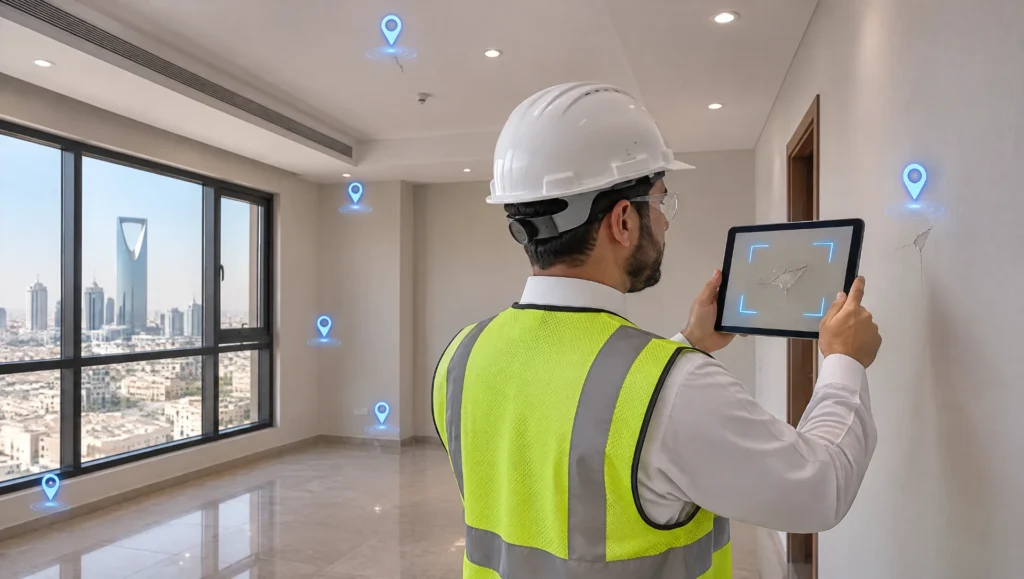
This is where PlanRadar is strongest. A site engineer opens the plan on a phone, taps the exact location of a defect, adds a photo and assigns it to the responsible subcontractor in seconds. Subcontractors and watchers can be added at no extra license cost, so the whole supply chain can close out snags inside the same system. Offline mode keeps work moving in basements, plant rooms and remote sites with weak signal, and reports are generated automatically for clients and consultants. (See how this works in practice in our guide to digital punch list software.)
Procore also covers the field well, especially for teams that want field data connected to the rest of the project. Its mobile app gives site teams the current drawing set, punch lists, daily logs, inspections, observations and photos, all linked to drawings, RFIs and submittals. A punch item in Procore can be traced back to the RFI or change that caused it.
In the field, Procore vs PlanRadar comes down to where the data needs to go. For pure snagging and handover speed, PlanRadar usually wins. For field data that must flow into project controls and reporting at company level, Procore usually wins.
Document control, RFIs and submittals

Procore treats document control as a core discipline. Drawings, specifications, RFIs, submittals, transmittals and meeting minutes have dedicated, structured workflows with ball-in-court tracking and full audit trails. Drawings are version-controlled, and RFIs and submittals are linked directly to the sheets they affect. Its AI agents are also designed to reduce admin around tasks like RFIs and submittals. For consultant-heavy GCC projects with formal approval chains, this structure is a major advantage, and it is where the Procore vs PlanRadar gap is widest.
PlanRadar handles document control through its document management module and flexible forms. RFIs can be set up as custom ticket forms with automatic numbering, defined roles and conditional fields, and submittal workflows can be configured the same way. This is flexible and works well for teams with simpler approval chains, but it needs setup, while Procore’s workflows are ready from day one.
Rollout time and user adoption
Rollout speed is one of the clearest Procore vs PlanRadar differences, and adoption is where many software investments succeed or fail. Research from the McKinsey Global Institute ranks construction among the least digitized sectors in the world, so the tool your team will actually use matters as much as its feature list.
PlanRadar is built for fast adoption. The setup path is short: create the project, upload plans, invite the team and download the app. Site teams who have never used construction software are usually capturing tickets within their first days, and the app is available in Arabic as well as English, which helps on sites with mixed teams.
Procore delivers more, so it asks more at the start. A good rollout defines company standards, permissions, cost codes and workflows before projects go live, then trains each role (project managers, site engineers, document controllers, commercial teams) on the tools they use. Planned properly, that structure is exactly what makes Procore valuable across a portfolio. GFT supports this with phased implementation, local training and ongoing support.
Licensing and cost structure
The two platforms price in very different ways, and this often decides the Procore vs PlanRadar choice for smaller firms.
Procore charges an upfront annual fee for each product, based on your annual construction volume (the total value of construction work managed in the platform). Unlimited users, data storage and support are included. This model works well for large teams: adding consultants, subcontractors or new staff does not change the price.
PlanRadar charges per user per month, with tiers that add more plans, BIM models, report templates and advanced features as you move up. Subcontractors and watchers are included for free. This model is easy to start small with: a contractor can license a few site engineers on one project and scale later.
Because both prices depend on your projects, region and package, GFT provides local quotes in UAE and Saudi pricing. Talk to GFT for a cost comparison based on your own team size and construction volume.
Which to choose by company size and project type

There is no single winner in Procore vs PlanRadar. The right choice depends on your company size, your project types and where your biggest pain sits today. For a wider view of the market, see our 2026 buyer’s guide to construction management software in UAE and KSA.
| Your situation | Best fit | Why |
|---|---|---|
| Large general contractor or developer, multiple projects | Procore | One system for project controls, documents, quality and cost |
| Mega or giga-project with formal consultant approvals | Procore | Structured RFIs, submittals and audit trails |
| Mid-size contractor focused on delivery and handover | PlanRadar | Fast snagging, inspections and reporting with quick adoption |
| Subcontractor, MEP or fit-out company | PlanRadar | Per-user licensing, mobile-first defect and task tracking |
| Consultant or project management firm | PlanRadar or Procore | PlanRadar for site supervision, Procore for full project oversight |
| Developer or facility manager focused on handover and snagging | PlanRadar | Visual defect lists, handover reports and asset documentation |
A simple rule of thumb: the larger your project portfolio and the more your commercial team needs live cost data, the stronger the case for Procore. The more your pain sits on site, and the faster you need results, the stronger the case for PlanRadar.
Can you use both?
Yes. Procore vs PlanRadar does not have to be an either-or decision, and many GCC organisations run both. The two platforms work well side by side when each one does the job it is best at. A typical setup looks like this:
- Procore runs project controls in the head office: documents, RFIs, submittals, change orders and cost.
- PlanRadar runs snagging, inspections and handover on site, including for subcontractors who do not need a full Procore login.
- Data flows between the two through integrations and PlanRadar’s open API, so defects and inspection results reach project reports without double entry.
This hybrid approach is common on large developments, where the main contractor standardises on Procore and the handover or quality team uses PlanRadar for fast, visual defect management. The key is to agree up front which system is the source of truth for each process, so teams never wonder where to log an issue.
Get a side-by-side demo from GFT

GFT is an authorized partner for both Procore and PlanRadar in the GCC, so our Procore vs PlanRadar advice is based on your projects, not on a sales target. For more than 20 years, we have supported 800+ industry leaders on 3,500+ projects, and we help each client choose the platform that fits their projects, not the other way around.
A GFT side-by-side demo shows both platforms on a workflow from your own projects, such as a snag list, an RFI or a site report. You leave with:
- A clear recommendation based on your company size and project types
- A local cost comparison for both licensing models
- A rollout plan with training in Arabic and English
- Local support during implementation and after go-live
See Procore and PlanRadar on your own project
Book your Procore vs PlanRadar demo and see both platforms working on your real workflows, with a local cost comparison for your team.
FAQs
What is the main difference between Procore and PlanRadar?
The main Procore vs PlanRadar difference is scope. Procore is an all-in-one construction management platform covering project management, documents, quality and safety, and financials. PlanRadar is a site-first platform focused on defects, inspections, site documentation and reporting. Procore runs the whole project; PlanRadar makes field teams faster.
Which is better for snagging and handover?
PlanRadar is usually the faster choice for snagging and handover. Defects are pinned directly to plans or BIM models from a phone, assigned to subcontractors at no extra license cost, and turned into reports automatically.
Is Procore or PlanRadar cheaper?
It depends on your company. PlanRadar charges per user per month, which is easy to start small with. Procore charges an annual fee per product based on construction volume, with unlimited users, which suits large teams. GFT can prepare a local cost comparison for your team.
Does PlanRadar support Arabic?
Yes. The PlanRadar apps support 25 languages, including Arabic, which helps on GCC sites with mixed-language teams.
Can Procore and PlanRadar be used together?
Yes. Many large GCC projects run Procore for project controls and PlanRadar for site snagging, inspections and handover, connected through integrations and PlanRadar’s open API.
Related Topics You Might Want to Check